More visibility
Promoted entries receive stronger placement and styling, increasing their chance of discovery and interaction.
Give strategic stores, official dealers, sponsored partners, and premium locations more visibility.

Select Promote entry, add an optional logo, and publish. No code or campaign setup required.
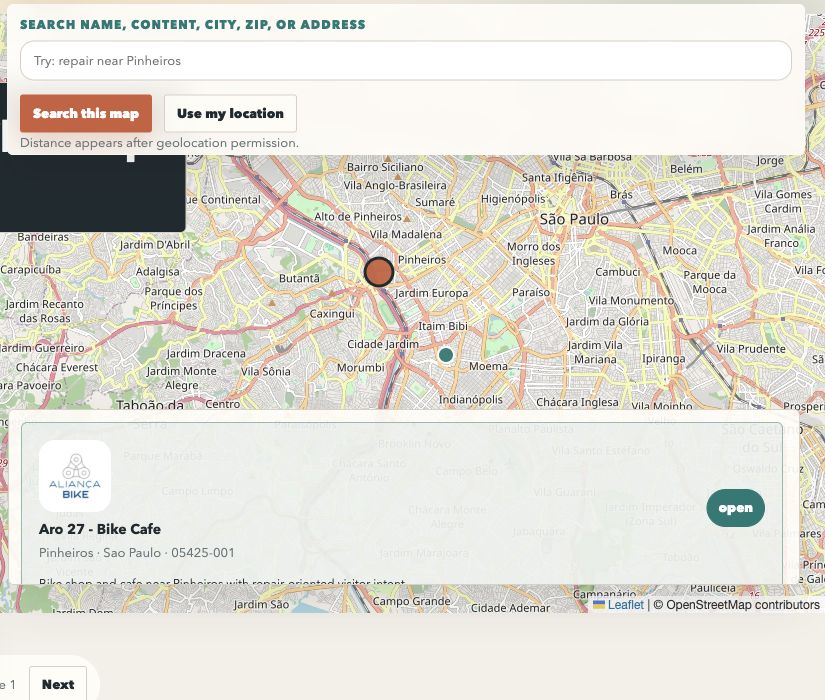
Real screenshot shows a larger promoted pin and a branded result card with stronger border and priority placement.
Promoted locations create a clear hierarchy inside the locator. Administrators choose which entries deserve emphasis, and ShopMaply reinforces them across the result list, map, and details without hiding organic results.
Promoted entries receive stronger placement and styling, increasing their chance of discovery and interaction.
An optional logo and promoted pin help customers identify official dealers, partners, and premium locations quickly.
Promotion is configured directly on the location entry without campaign setup, code, or manual map editing.
Dedicated events track promoted entry, logo, website, and directions views and clicks.
The feature combines ranking, visual identity, and brand context so important locations stand out without disrupting navigation.
Promotion reinforces strategic locations that match the current query. Customers still see relevant choices while recognizing priority places immediately.
Configure individual entries in the admin panel. Larger operations can also import promotion status and logos through CSV.
In the locator admin, open Entries and select the store, branch, partner, or dealer that should receive more visibility.
Under Visibility, change Regular entry to Promote entry. ShopMaply records the promotion as a manual setting.
Enter a public PNG, SVG, WEBP, or JPEG logo URL. The preview confirms whether the image can be loaded.
In Theme, configure the promoted pin and tune logo background, size, radius, and spacing to match the brand.
Publish the entry and theme, verify the public locator, then use Analytics to monitor promotion-specific interactions.
Promotion can represent commercial priority, official status, sponsorship, quality, or operational importance.
Differentiate approved partners to increase trust and guide customers toward authorized locations.
Emphasize locations with broader inventory, premium experiences, exclusive launches, or special services.
Create featured inventory for commercial agreements while keeping other locations available in the same search.
Highlight new stores, priority regions, temporary events, or campaign participants.
Customize locator pins, logos, maps, and layouts.
Learn more →Measure views, clicks, directions, and conversions.
Learn more →